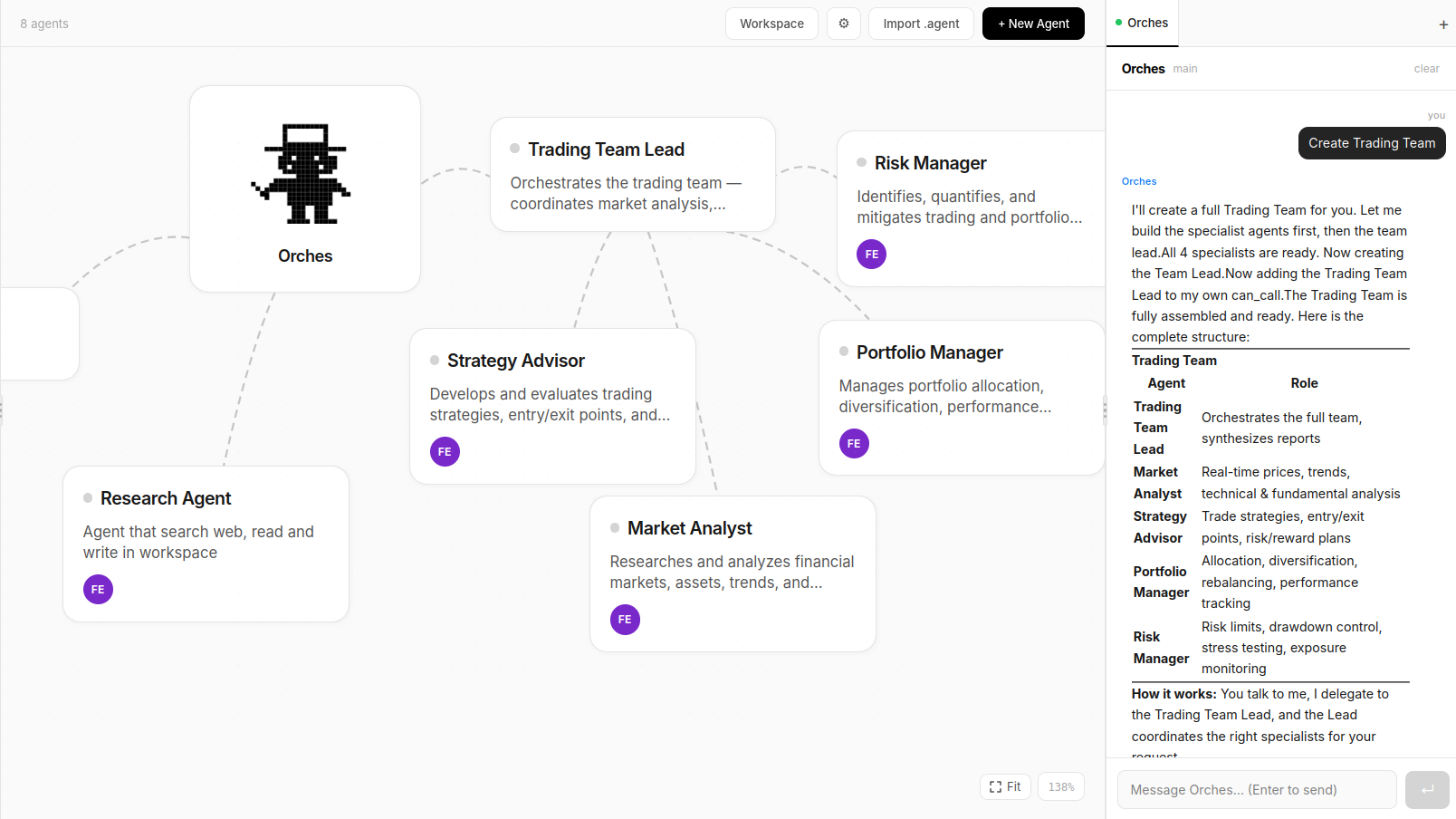
From a single agent answering questions to a full team researching, writing, and shipping.
⬡
Visual Agent Graph
See your entire agent network in a live, interactive graph. Watch tasks flow between agents in real time.
⇢
Delegation Chains
Agents delegate tasks to specialized sub-agents. The main agent coordinates, sub-agents execute. Configurable depth.
◧
Built-in Workspace
Agents read and write files in a shared workspace. Upload files in chat, open results directly in Canvas.
◫
Canvas
Agents present results as rich pages — Markdown, code, tables, charts, and a live browser — all inside the UI.
⊕
MCP Servers
Connect any MCP-compatible service — GitHub, Notion, Linear, databases, and more — and make those tools available to agents.
◉
Memory
Agents remember context across sessions. Auto-summarization keeps history compact without losing important context.
📅
Scheduled Tasks
Schedule agent tasks with cron expressions or one-time datetimes. Works on SQLite and PostgreSQL equally.
✦
Self-Assembly
Ask the main agent to build a team. It creates, configures, and registers new agents using the create_agent tool.
⚿
Multi-Provider Keys
Add API keys from any provider through the UI. Assign different models to different agents. Keys never touch git.